Frequently Asked Questions
-
- Q. Is attendee registration required to watch the webinar?
- A. Yes, attendee registration is required. Once registered, your information can also be used to participate in other webinar weeks.
-
- Q. Can I modify the information I registered with?
- A. Once registration is complete, a My Page will be created. You can edit your registered information from your My Page.
-
- Q. How can I access My Page?
- A. You can access it from the top section of the webinar week event site via Register
-
- Q. Can I cancel my registration?
- A. Yes, you can delete your registration (withdraw) through My Page.
-
- Q. Can individuals register?
- A. Webinar week is an event for business matching purposes, so registration is limited to business use only.
-
- Q. Are there recommended system requirements for watching the webinar?
-
A. The following are recommended:
PC
Recommended: Google Chrome (latest version)
Supported: Microsoft Edge, Safari (latest versions)
*Internet Explorer is not supported.
Smartphone
iOS: Google Chrome, Safari
Android: Google Chrome
*Latest OS versions are recommended.
-
- Q. How can I watch in ZOOM?
-
A. Please refer to the following link:
https://support.zoom.us/hc/en-us/articles/201362193-Joining-a-Zoom-video-call
*You can use it without creating an account or downloading the app.
-
- Q. How can I watch the webinar via Teams?
- A. Please refer to the following:
https://support.microsoft.com/ja-jp/office/teams
*No account creation or app download is required.
-
- Q. How do I register for webinar week?
- A. Please prepare an invitation code and click "Attendee Registration" on the top page to proceed with registration.
-
- Q. What is an invitation code?
- A. It is a required event invitation code to attend webinar week.
-
- Q. Where can I get an invitation code?
- A. Please contact participating companies directly to obtain the invitation code.
-
- Q. Can multiple people share the same registered ID?
- A. No. Since direct communication with participating companies may occur, ID sharing is not allowed. Each participant must register separately.
-
- Q. Can I reserve a webinar in advance?
-
A. You can make a reservation to watch by clicking “Watch/Reserve” on each webinar’s detail page in advance.
《How to Reserve》
1. From the timetable on the TOP page, select (click) the webinar of your choice.
2. Click “Watch/Reserve” on the webinar detail page.
3. Follow the on-screen instructions to complete your reservation.
-
- Q. How do I watch the webinar?
-
A. From 10 minutes before each webinar starts, you can access the distribution URL.
《How to Watch》
1. From the timetable on the TOP page, select (click) the webinar of your choice.
2. Click “Watch/Reserve” on the webinar detail page.
3. Follow the on-screen instructions to watch.
* Reserved webinars can also be accessed from “Viewing (Reservation) History” on My Page via the My Page icon.
-
- Q. If I cannot watch the webinar live, can I watch it later?
- A. Most webinars have archived recordings. The availability of the archive depends on each participating company, so please contact them individually.
-
- Q. Will participating companies contact me?
- A. If you perform any of the following actions, your attendee information will be shared with the company hosting the relevant webinar. Based on this information, the hosting company may contact you directly.
Additionally, some companies may conduct independent surveys during the webinar. If you respond to such surveys, there is a possibility that the company may contact you directly.
Your information will not be shared with companies whose webinars you have not reserved or viewed.
When do exhibiting companies receive attendee information?
When an attendee reserves a webinar.
When an attendee watches a webinar.
When an attendee downloads materials from the webinar details page.
-
- Q. Can I contact a participating company directly?
- A. Yes, please contact them using the information listed in the company details. If you cannot find the contact information, please reach out to the webinar week office via the inquiry form on My Page.
-
- Q. Can my company participate in webinar week as an exhibitor?
- A. Yes, please contact the office via the inquiry form.
-
- Q. Can I request support for hosting my own webinar?
- A. Yes, please contact the office via the inquiry form.
-
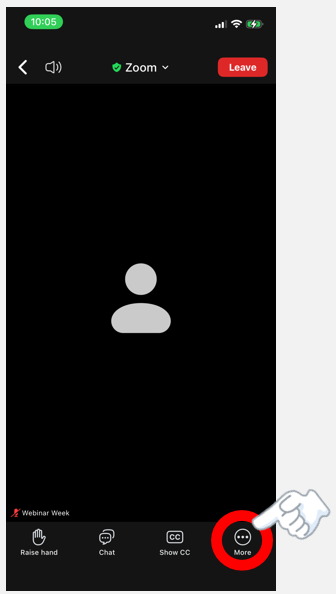
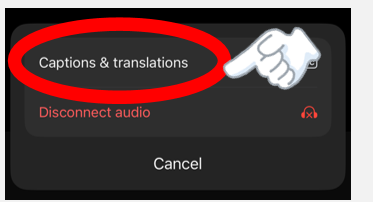
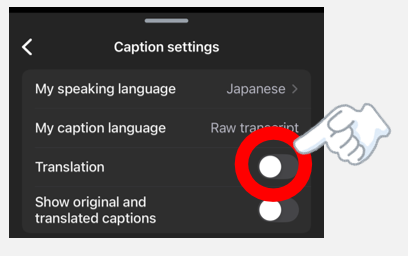
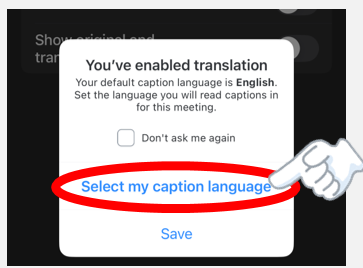
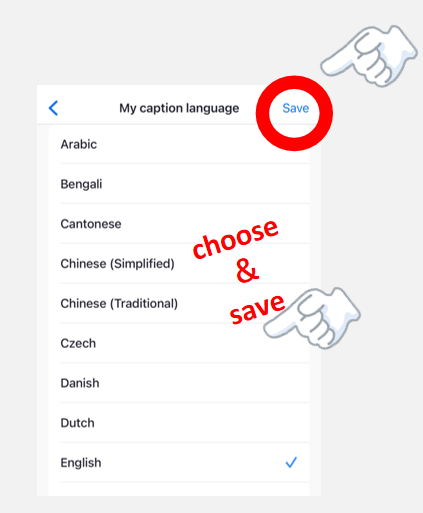
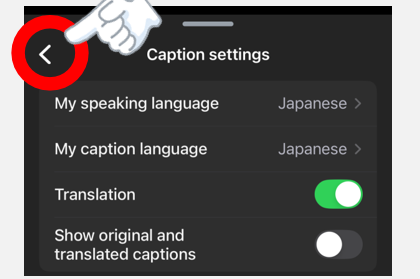
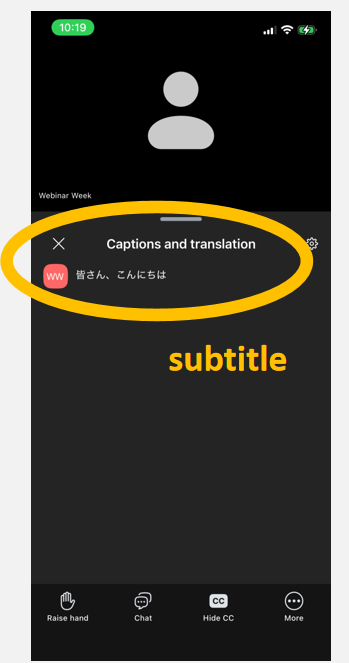
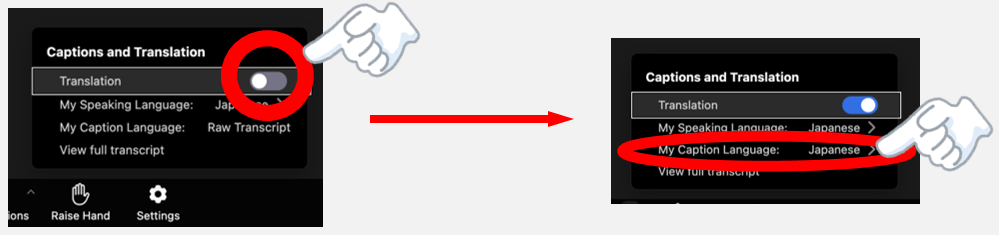
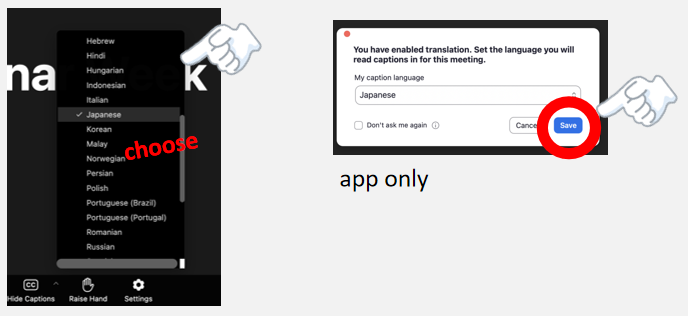
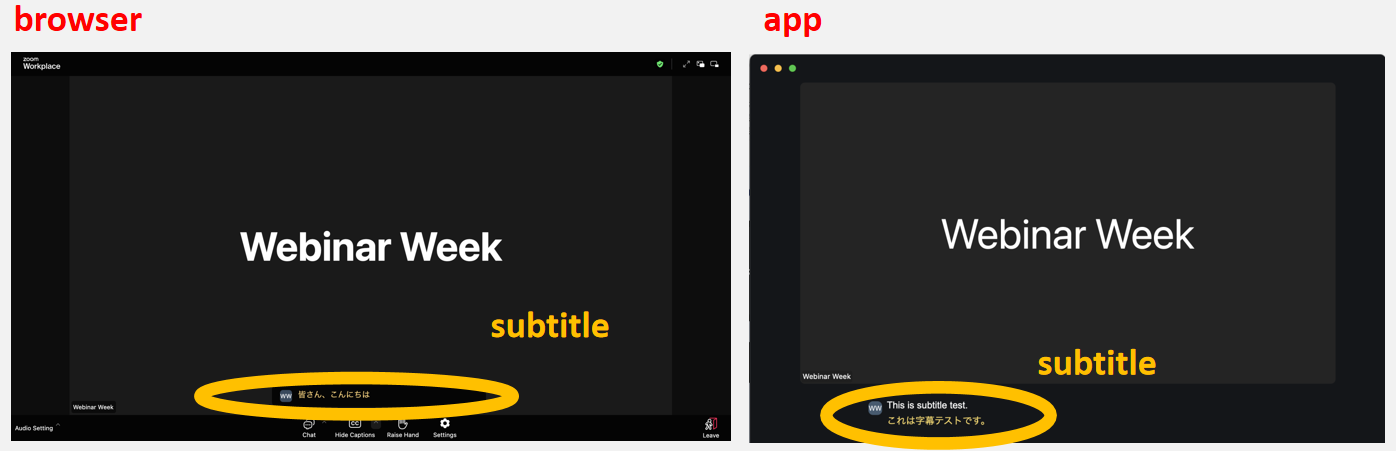
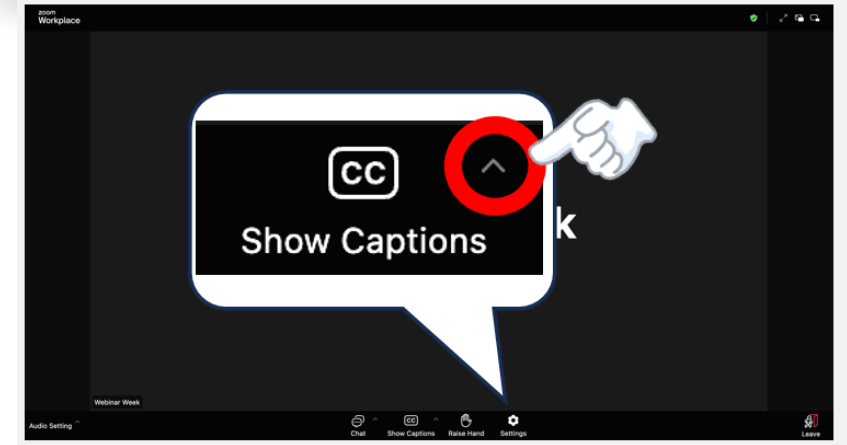
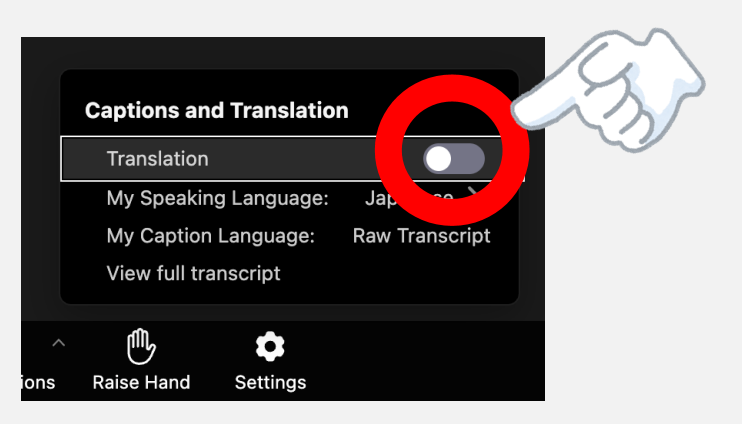
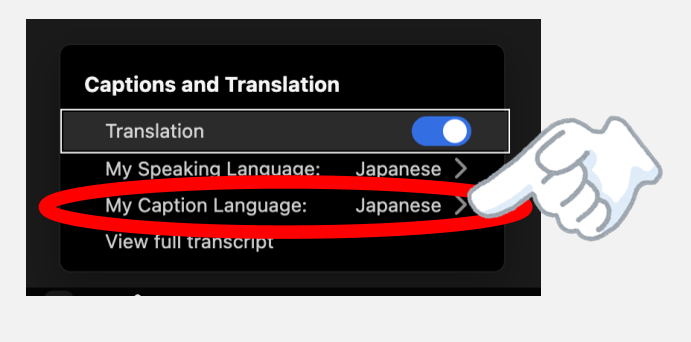
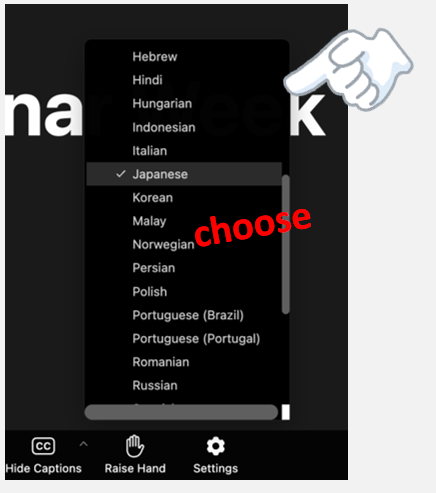
- Q. How to enabling and configuring translated captions ?
For Youtube
YouTube Auto-Translated Subtitles
If you would like to view subtitles in your preferred language:
1.Click the Settings (⚙️) icon on the YouTube player.
2.Select Subtitles/CC → 3.Auto-translate.
Choose your preferred language.
Please note that subtitles are automatically generated by YouTube and may not be completely accurate.
For Zoom
For PC :
Continue on mobile / Smartphone
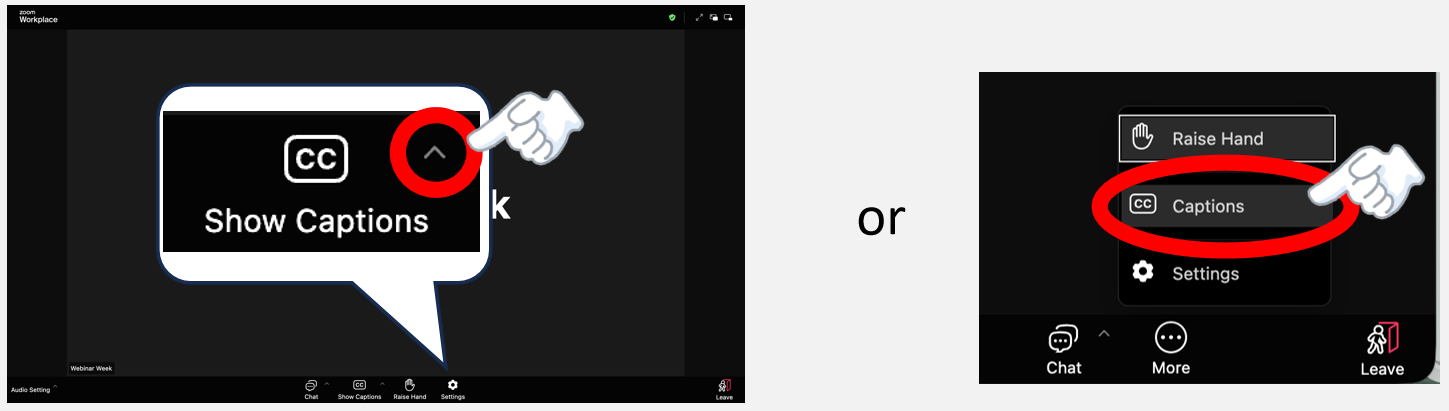
OR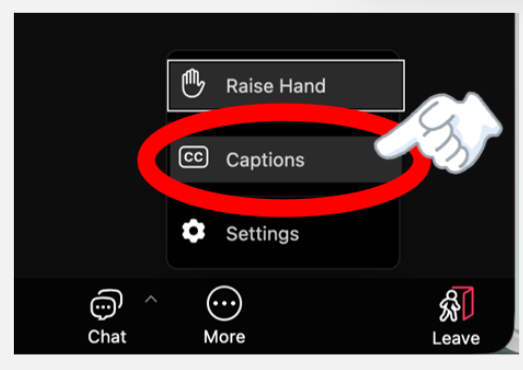
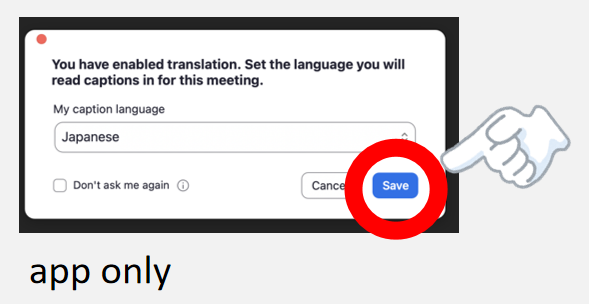
Browser :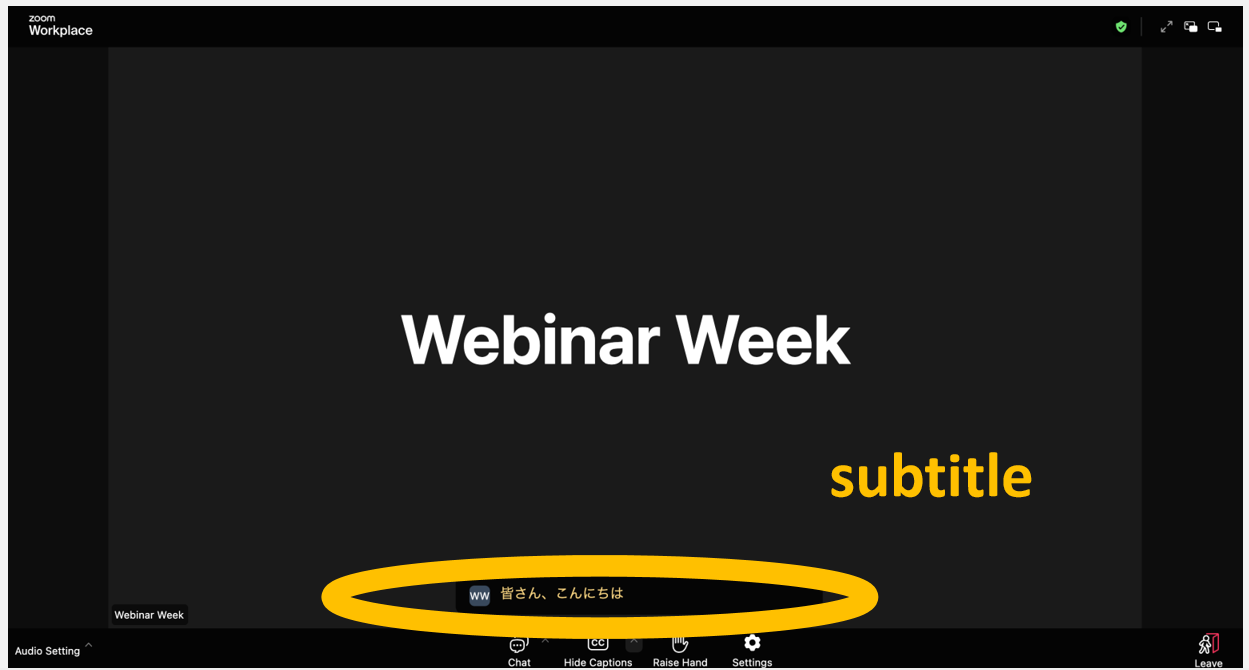
APP :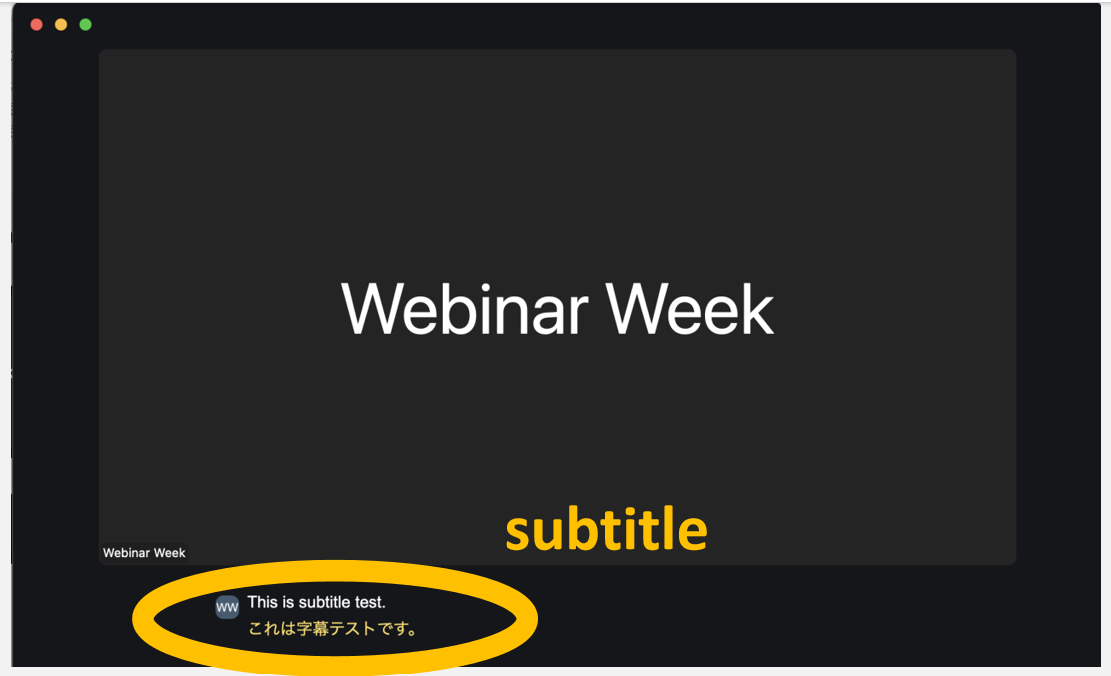
For smart phone :